Defect Management Workflow: States, Triage and the Handover Problem
A guide to designing a defect workflow that survives contact with a real team — how many states you need, why priority and severity are different fields, and what breaks when bugs live in two systems.
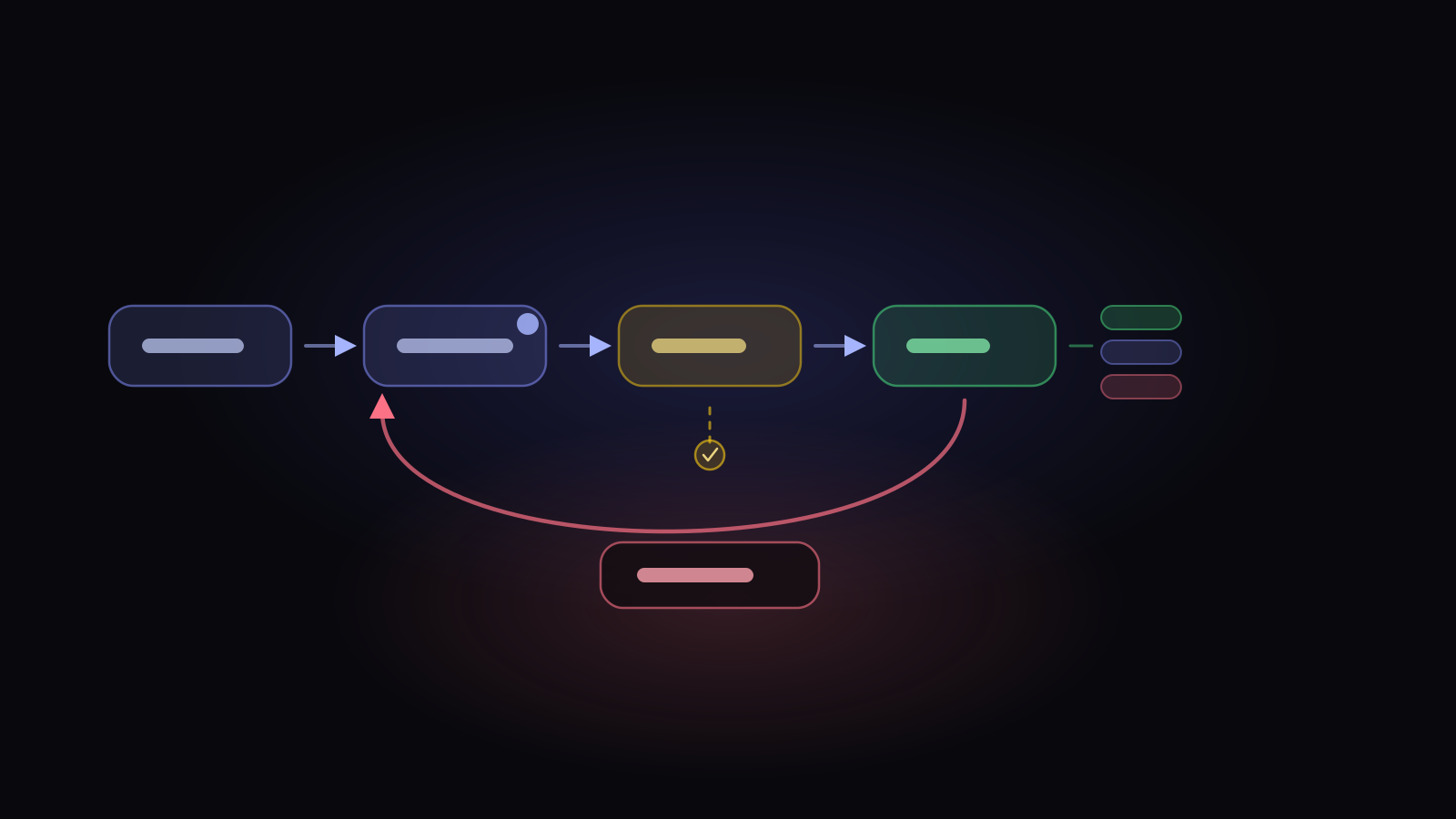
A defect management workflow is the set of states a bug moves through and the rules about who owns it in each one. The states are the visible part and the easy part. The workflow is really about handover — who is responsible right now, and what has to be true before it becomes somebody else’s problem.
Most workflows fail in one of two directions. Too many states and nobody maintains them, so half your bugs sit in a status that stopped meaning anything a year ago. Too few and you can’t answer the only question that matters during triage: who has this, and what are they waiting for?
How many states you actually need
Five is usually right, and they’re these:
New — reported, not yet looked at. This state exists so triage has an inbox. If bugs land straight into “open”, nobody can tell what’s been assessed from what’s merely been filed.
In Progress — someone is actively working it. The key word is someone: this state should never exist without an assignee, and an In Progress bug with no owner is the single most common lie in a bug tracker.
Resolved — the developer believes it’s fixed. Deliberately not the end. The fix hasn’t been verified, and the person who wrote it is the worst-placed person to confirm it.
Closed — verified, or explicitly decided against. This is the terminal state, and it needs a reason attached, which we’ll come back to.
Reopened — it came back. Worth having as its own state rather than pushing the bug back to New, because reopen rate is one of the few genuinely diagnostic quality metrics you get for free.
Resist adding more
Every extra state needs somebody to move things out of it. “Ready for QA”, “Awaiting deployment”, “On hold”, “Needs info” all sound useful and all become graveyards, because the trigger to leave them is somebody else’s action that nobody is watching for.
If you need those distinctions, prefer an attribute over a state — a flag, a label, an assignee change. Attributes don’t create a queue that somebody has to keep emptying.
Close needs a reason
“Closed” collapses at least five very different endings, and losing that distinction destroys your ability to reason about the backlog later:
- Fixed — changed and verified.
- Duplicate — the same as another defect, and the link matters.
- Rejected — working as designed, or not a bug.
- Deferred — real, accepted, not being done now.
- Withdrawn — the reporter retracted it.
Without this, “we closed 200 bugs this quarter” is unreadable. With it, you can see that 60 were duplicates (a reporting problem), 40 were rejected (an expectations problem), and 30 were deferred (a backlog that will resurface).
- New triage inbox
- In Progress always has a person
- Resolved “I think it’s fixed”
- Closed with a reason
- Fixed
- Duplicate
- Rejected
- Deferred
- Withdrawn
Priority and severity are different fields
This is the most common modelling error in defect tracking, and it produces the most argument.
Severity is impact — how bad it is when it happens. A crash is severe whether it affects one user a month or everybody.
Priority is urgency — how soon we’ll deal with it. That’s a business judgement about impact and frequency and who’s affected and what else is on.
Collapsing them into one field forces a false trade. A cosmetic typo on the signup page can be low severity and top priority, because it’s the first thing every prospect sees. A data-corruption bug in an admin tool two people use can be maximum severity and genuinely not this sprint. One field can’t say either of those things.
Triage is a meeting with an agenda
Triage is where the workflow either works or becomes decoration. A useful triage pass answers four questions per defect, in order, and takes about ninety seconds — which is only realistic when the report already carries its own context, rather than being retyped from memory at the end of a test run.
The failure mode is triaging by list order. Sort by severity, then by age, and handle the stale high-severity ones first — those are the bugs that have been quietly decaying while everyone worked the recent ones.
The handover problem: bugs in two systems
Most QA teams find bugs in a test tool and developers work them in an issue tracker. This is the point where workflows usually break, and it’s worth being clear-eyed rather than optimistic.
Two-way synchronisation is much harder than it sounds. Status vocabularies don’t map cleanly, both sides can change the same field, and any conflict rule you pick will be wrong sometimes. Teams that attempt full bidirectional sync usually end up with a third state: what the tracker says, what the test tool says, and what’s actually true.
The pattern that holds up is a single source of truth per field. Pick which system owns status. Let the other display it. Anything else needs a conflict policy nobody wants to write.
How this works in Hawzu
Five statuses, fixed and workspace-wide: New, In Progress, Resolved, Closed, Reopened — the set above, and deliberately not configurable. Closing requires a resolution from Fixed, Duplicate, Rejected, Deferred, Withdrawn, and the two rules the system enforces are narrow: a resolution is only valid when the defect is closed, and moving a defect back out of Closed clears its resolution automatically.
There’s no fixed path — any status can move to any other. That’s a deliberate trade: transition rules are the part of a workflow that goes stale fastest and generates the most “why can’t I…” support, so the product enforces correctness of data (a closed defect has a reason) rather than correctness of path.
Priority and severity are separate fields with different vocabularies — priority High/Medium/Low, severity Blocker through Enhancement — and reporter and assignee are separate too. Notifiers are watchers: on creation the assignee and reporter are subscribed automatically, and anyone who acts on a defect is added unless they opt out.
Defect boards are a Kanban view over the same defects the list holds. Group by status, assignee, severity, priority, release or a dropdown custom field; add swimlanes; set per-column WIP limits that warn or block. Dragging a card counts as an ordinary edit, just like changing the status in the list, so history, notifications and webhooks all follow — and dropping into Closed asks for the resolution rather than letting the reason go missing. Boards can be private, project-wide, or shared with named people; sharing governs the board configuration, while the cards are always read with the viewer’s own permissions.
Similar-defect detection runs while you type. Once a draft has enough substance it looks for defects that describe the same problem, not just ones that share a few words. What it offers depends on what it found: an open near-identical match offers Close as Duplicate, while one that’s already Resolved offers View solution, which is usually the more useful outcome.
For triage, the defect list carries around twenty named quick filters with live counts — Stale Defects, Unassigned Critical, Release Blockers, Needs Triage, Stuck in Progress — and supports inline editing of priority, severity, status, assignee and due date directly in the row.
Three limits to state plainly. There are no bulk operations on defects — no multi-select, no bulk assign or bulk status change, on either the list or the board. Issue-tracker links show status; they don’t sync. You can file a defect as a new issue in Jira, GitHub, GitLab, Azure DevOps or Linear, or link it to an issue that already exists, and Hawzu then displays that issue’s status. It does not write your changes back, and it does not overwrite the Hawzu defect from the tracker. And there are no automation rules, no escalation and no configurable SLAs: aging is reported in fixed buckets, and the only date you set is the defect’s due date.
Defects in Hawzu, end to end
Key takeaways
- Five states is usually right. Every extra one needs a person whose job is to empty it, or it becomes a graveyard.
- Keep Resolved and Closed separate. That gap is the handover from “I fixed it” to “someone verified it”.
- Always close with a reason. “200 bugs closed” is unreadable without knowing how many were duplicates, rejections and deferrals.
- Severity is impact and rarely changes; priority is urgency and moves constantly. One field can’t express both.
- Triage by severity then age — the stale high-severity bugs are the ones quietly decaying.
- Before trusting any tracker integration, ask which direction each field flows and what happens on conflict. Showing another system’s status is not the same as keeping the two in agreement.
Common questions
What states should a defect workflow have?
What's the difference between defect priority and severity?
Should defects be closed with a resolution?
Should QA defects live in the test tool or the issue tracker?
How do you stop a defect backlog from growing?
Do you need transition rules in a defect workflow?